Showing posts with label Community Article. Show all posts

Monday, December 2, 2013

Community Article: Interview with Carbon131!

Carbon131Today I bring you an interesting dialogue between PixelTM and Carbon131 - the creator of Jet Wars: Advanced Battle; an extremely popular game on ROBLOX.  Enjoy! 

PixelTM (Formerly Kintozi): Who/What inspired you to make these amazing games?

Carbon131: I have always enjoyed making people happy. Whether it is making them laugh or just making something they enjoy. This is what lead me to spending hundreds of hours building and scripting on ROBLOX. I don't necessarily think my games are amazing, I am simply glad people enjoy them.


PixelTM: What is Battleblox?

Carbon131: It is a domination type game where players must capture their opponents flag and also kill them to gain points. The team with the highest points after the round is up, wins. It has tons of vehicles ranging from Jets, Boats, Jet Skis, soon-to-be Humvees, and possibly even helicopters. I hope to add a variety of weapons as the game progresses.


PixelTM: What are your final hopes for Battleblox and Jet Wars: Advanced Battle?

Carbon131: For it to be lag free. The biggest thing I struggle with on ROBLOX is making places that don't struggle with lag. This, however, is an issue with many moving parts. With multiple jets, boats, land vehicles, players, etc., moving all at once, it is a lot for ROBLOX to handle.


PixelTM: Do you have any words of inspiration for hopeful game builders/programmers?

Carbon131: When you look at the giants of ROBLOX, i.e, the big game creators, just remember, they were once small as well. Start small, then go big. Quality is always better than quantity. If you make a place with a few awesome weapons and gameplay, odds are it is going to do much better than a place with tons of meh weapons, and poor gameplay.


This community written article was provided by PixelTM. We look forward to seeing more content from him in the future!
 

Thursday, June 20, 2013

Community Article: Interview with MahPizzaIsHere!

Ever since I viewed the update #1 video on YouTube of the infamous 'Borderline' project; I was shocked as to how great it looked, even in such early development stages! In my words, if I had a choice between Borderline or Battlefield 3, I would choose Borderline! In my opinion when it's completed, it'll wipe Apocalypse Rising v5.0.4, Battlefield, etc off the front page! 

Now for my interview with MahPizzaIsHere which was conducted through the ROBLOX chat feature!


MahPizzaIsHere

Me: Hello Mah.

MahPizzaIsHere: Hello.


Me: Will Borderline have lens flare?

MahPizzaIsHere: Most likely.


Me: How will vehicles work,control-wise?

MahPizzaIsHere: Can you be more specific?


Me: Like keyboard controls and mouse controls.

MahPizzaIsHere: A combination of the two. It varies by vehicle.

Me: How will vehicle movement be? Obviously not just clicking and going to that direction like normal ROBLOX planes,helicopters,etc?

MahPizzaIsHere: We'll be largely developing our own movement. While ground vehicles will drive in a way that at least mimics classic physics, air vehicles will be much more intuitive. Comparable, perhaps, to Crazyman32's physics.

Me: Can you go third-person in vehicles?

MahPizzaIsHere: We expect to implement that feature, yes.

Me: Rumors have been going around stating,your character spawns by parachuting in the map. Are these rumors true?

MahPizzaIsHere: I'd like to know who started them, haha. While we were never planning this feature, it does sound intriguing.


Me: I don't really know who started the rumor. It just got passed to me.

MahPizzaIsHere: Interesting, haha. It sounds pretty cool though, I'll discuss it with StudioMM.


Me: Will aerial vehicles have similar flight like it does in Battlefield 3?

MahPizzaIsHere: Having never played Battlefield 3, I wouldn't be able to say for sure. However, we can guarantee an immersive flight and combat experience.


Me: What will character movement be like?

MahPizzaIsHere: We'll have some nifty camera moves for certain actions, and the requisite head bob when walking and running, but aside from that it is essentially everything you'd expect from an FPS game.


Me: What type of gameplay will it be like? Battlefield 3 related gameplay or ArmA 3 related gameplay?

MahPizzaIsHere: At heart, it is an arcade shooter. Realism will only go so far, and we want this to be fun too. Having never played either game, you'll have to make of this what you will.


Me: Will maps change?

MahPizzaIsHere: Yes, for sure. There will be four distinct maps, each supporting several game modes.


MahPizzaIsHere: Well, I must go, good-bye.

Me: Bye. Good luck with the development of Borderline,to all of you.


This interview proved to be intriguing. Borderline will be released in 2 months time! I for one, can't wait!


Thanks are owed to Kintozi for providing Roblox News with this interesting community interview. We hope to be hearing more from him in the future!

Edited by arbirator

Tuesday, May 7, 2013

Community Article: Interview with best3000!

In today's community article we have an interview with best3000; one of the winners of the Dynamic Lighting Video Contest! His winning entry can be viewed below:

best3000

Q: Rank from 10 to 0 how good you are at making videos.
A: Mostly like to be 3, as because I work alone with not many skills as to edit the acting/showing footage.


QRank from 10 to 0 how good you are at lua programming.
A: -1, no kidding. From the start (08 Feb 2008) I always play the games that other people created with awesome lua skills. When I go in the studio I ought to look left and right then say "I have no knowledge of lua".


Q: What inspired you to do what you did?
A: The first segment of the video of John's dynamic lighting footage give me the idea to inspire to make that part as in my contest video. But it seems so small and did not show everything as I wish it to be. So I enlarged it and it perfectly lags up my computer, it even put my fps to 3-5. The second one I was inspired by realflow flooding, but it seem so pale without lights. So I dump up the light and that is the result. About the Tetris, I have in idea for the last segment so I think up the game that can present up the dynamic lighting and Tetris came up in my mind. In before all of that happens I have the first idea that seems to be a fail (it is). It consists of a car In the night with some street lights, slender man with flashlight, top it off with nothing (or something that I have forgot). And it tells of stuff with a board with some words on it. I eventually scraped that idea and bring up a new one. Showing of before and after style, example : spiral stairs,offices,dark corners. I end up scraping that one too, the only thing that remains today is the beauty of dynamic lights. 


Q: What do you think of your work? Is it good or bad in your opinion?
A: I think it is "pretty good". Turns out I'm the oddballs among the winners of the dynamic lighting group. Where I show the beauty of it through lighting spheres and Tetris. Where other people shows up the beauty of dynamic lighting through epic structures and building.


Q: Did you have help?
A: Not at all. I was alone and tends not to ask for any ideas, as if my friend in roblox didn't online that much and friends in my steam don't know anything about roblox or dynamic lighting at all.


Q: What did you use in order to complete your video?
A: I used : Roblox studio 2013 (duh) , a lot of spheres and screen shots , Playclaw (a recording software) and Sony Vegas 12.


Q: Anything you regret?
A: I regret that I could have done it better.


Q: Would you like to be famous?
A: A "Well known" would be enough for me.


Master of Light and Darkness Hat

Q: Did you get anything for being in the top 10?
A: I did get some lesson and a hat from this. A lesson : keep trying, your persistence hasn't died just yet to enter the contest. You can be better than this. A hat : epically "Worth it!". 


Thanks are owed to will78962 for submitting this excellent interview to Roblox News. We will be looking forward to future interviews from will!


Monday, May 6, 2013

Community Article: City of London

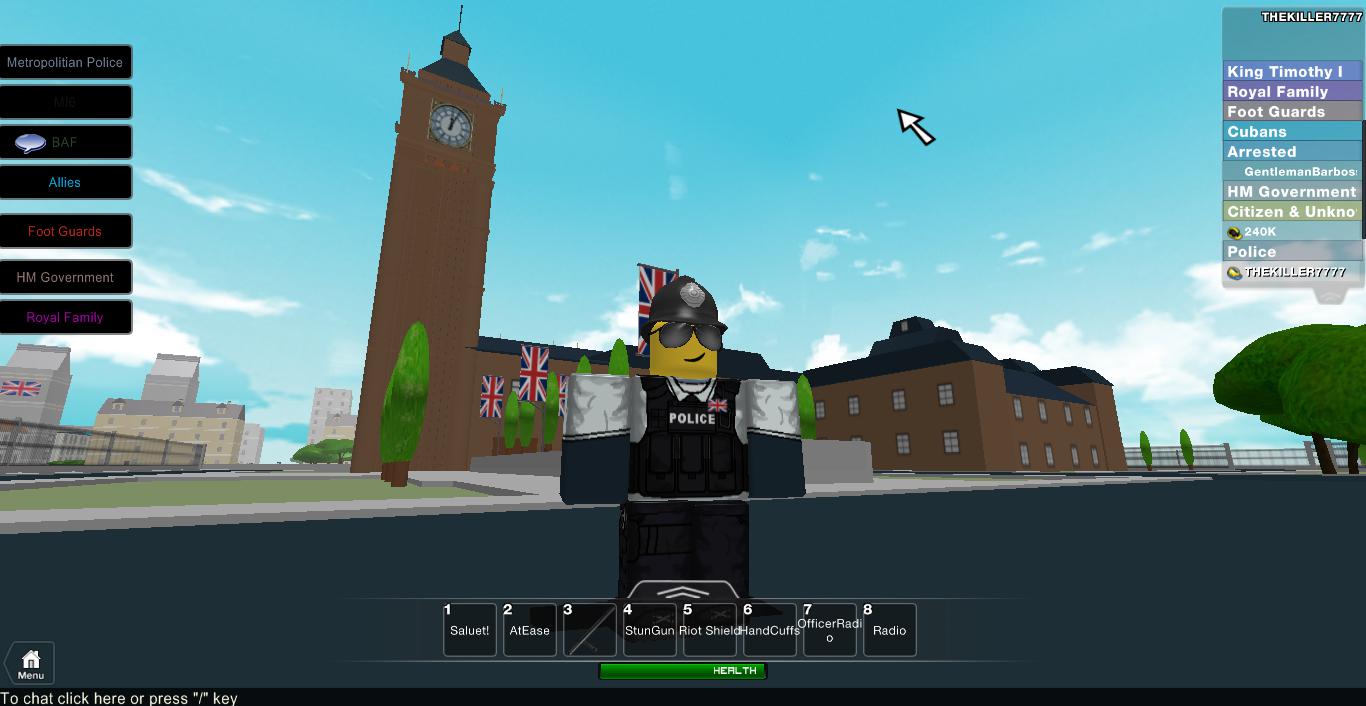
There are some places on ROBLOX that closely resemble real life places, towns and cities, one of them is London. User cooldude215 has replicated London in such a good way with his place 'City of London' It would be close to impossible to completely remake London as it is now in real life, imagine the lag! cooldude has managed to bring some of the iconic London landmarks and put them together on a map, including the Houses of Parliament, Downing Street and even Buckingham Palace! Not only that, but he’s brought the City to life, replicating services such as Police and Foot Guards (Guarding the Royals). He’s even got a Government and a Royal Family! 

I myself am a Police Officer (Constable) and get the tools real life Police Officers would get (Apart from a baton). It’s the same with the other teams, like the Foot Guards and MI6, they get the tools they would usually have in real life. They even have Groups to go with them, and real life ranks.

Of course, in order to do a job, there are certain places to guard. The Police have a duty to guard the Houses of Parliament, Civilians are not allowed in. Trespassers can be arrested or killed if they go past the flags. Police also have a duty to guard Downing Street, although constant guard is not required as there are gates. Again, people who trespass in Downing Street will be arrested or killed. Police also have cars, along with MI6 so they can get around the City fast. Police also have a duty to write criminal records of people if they commit a crime other than trespassing. Again, this is another real life comparison. Foot Guards have to job of guarding the Royals, they usually hang around Buckingham Palace, and again, trespassing will get you shot.
The amount of detail that has been put in is amazing, all the replica buildings look like their real life equivalents.  Cooldude has really done a good job making London look like the real one. The community is great, everyone helps each other and it’s just a really fun place to be. When there aren’t many Police on duty, the Army (BAF) help keep the peace. 
Overall, this is an amazing place. Built well, scripted will, and has a great Community. It’s definitely a place worth visiting. Overall: 9/10
Thanks for Reading!
We'd like to thank THEKILLER7777 for submitting this well constructed, and detailed community article to Roblox News! We'll be looking out for more articles by him in the future!

Saturday, June 23, 2012

Community Article: Catalog Heaven Place Review


As a new community poster I bring you my first place review. Today's review is on a well known testing place named Catalog Heaven. It was created on May 8, 2010 by Seranok. Since then it has seen almost four million users. Catalog Heaven is a place where many things can occur. Some of these things are that you can get together with old friends, duel on bridges, test silly hat combos, or just brutally gain knockouts. Whatever your style, this game is truly for everyone. Recently I went into to a server for the first time. I was truly impressed by the scripting shown by the creator. Although the map could be argued to be poorly made, he definitely makes up for it in his scripting skills.

Scripting: 10/10
     The scripting in Catalog Heaven is almost mesmerizing. The creator obviously put a lot of effort into the selection GUI. The GUI is very well organized, as it contains subtopics to narrow your search such as a search bar, a pricing subtopic (R$ and tix) and an item type subtopic (hat, gear, etc.). With this you can alter your appearance or test anything you want. Everything ever published is included, so you can test those items you never had the chance to buy. Also you have the ability to use a GUI that toggles the force field around your spawning area. This can be useful as it makes it possible to test gravity effecting gears such as balloons or the gravity coil. Although this is true, upon visiting I learned it was more utilized for sniping people below or quicker transportation the  map below. The last scripted item was the teleportation pad inside the spawning room that took you immediately to the map. Sadly people would then wait for you to teleport and then spawn kill.

Gameplay: 8/10
     There is much to do in the small map. You can test virtually anything before you buy it, such as testing a new look or just testing any gear you want. Sadly many people come here to gain knockouts from new and inexperienced players. They select drastically over powered weapons and kill anyone; not caring if they are only testing docile gear. Although fighting and testing are the main purposes of the game, there are more than just those two aspects. You can also just hang out with friends or even make new friends. My favorite thing to do in Catalog Heaven has to be dueling with friends on one of the two bridges that hang over the spike pit. Although the only pitfall of this is other players or your opponent may place traps that turn invisible after some time. This can also be a useful tactic by standing on the bridge surrounded by traps and lure people out and into the traps. 

Popularity in the Community: 8/10
     The place is more popular with experienced players than those of new. This mostly because the experienced players are more apt to know the best weapons and how to use them against less educated and newer players. Feedback from a friend of mine, Skitty7, who frequently plays there says that,"It's a lot of fun to test everything but there are occasionally those really annoying people who just spawn kill and prevent you from having fun testing things like lol gears or silly hat combinations."

Popularity to Me: 10/10
     I really like this place as it brings out the joy in me while testing silly hats or gears with fun effects. I can get an entire server to laugh with me or at me with my quirky anttics I can show off with these gears and hats at my disposal. I would really enjoy to see this place flourish with good fighters, but also ones that can step back for a moment and just laugh it off.

Overall Score: 9/10


Many thanks to Regilord for providing this brilliant Community Article! 


Tuesday, May 15, 2012

Community Article: Retexturing Guide 101 by nuke98

nuke98
Okay, so I know there are a lot of retexturing guides out there on the internet, but there seems to be a lack of good retexturers in the basic ROBLOX community. So, I am making this thread if you do not know how to retexture, or if you do, and want other tips. I am going to combine tips from multiple professional retexturers (IBarrageI and the sort) to smooth out your skills.
________________________________________________________
Basics
Tools - 1A
Where to find the texture - 2A
How to retexture - 3A
Re-applying the retexture - 4A
Publishing the hat as a model - 5A
Advanced/Tips
Texture Mapping 1B
Hue and Saturation control 2B
Adding Realism 3B
Tips 4B
________________________________________________________
1A
The basic tools you will need to retexture is simple. ROBLOX studio, to access the hat files. You will need a image editing program, such as Paint.net or Photoshop, however the best program is determined by the user. Try different programs! These are all the tools you will need. Simple.
________________________________________________________
2A
To find a texture of a hat or gear, you first must open up your Edit (ROBLOX Studio). Next, is a bit risky. Go into free models, and search the hat you are wishing to retexture. This is risky because many models are infected with a virus. After you have found a non-infected hat, you select it, which highlights it in the explorer window on the right side of the screen. Next, press the plus button on the highlighted item. In the selections available, click "Mesh". Next, below the explorer window, in the properties, go down to the "TextureId" slot, and copy the numbers in the link. That is the ID number of the texture you are using!
________________________________________________________
3A
Okay, now that you have the ID number, you can go to any item in the catalog. Literally any. Now, once you are there, up in the URL bar, replace the end numbers in the current URL with the numbers you got from your texture. Press enter, and you will come to your hats texture! Once you are there, copy the image and paste it into your image editing program. Now, you can edit it however you wish. This is not something you can or can't do, so get creative! Save it to your computer in an easy to access folder or on your desktop, then you can close all your programs to clean up your workspace.
________________________________________________________
4A
Now that you have your texture, you must upload it as a decal. Go into your Stuff tab under My ROBLOX, and click on Decals in the left selection. Above all of the decals, you should find a "Create decal" link. Click it, then do as the instructions say to upload a decal. After you have done that, go to your freshly uploaded decal, and copy the numbers at the end of the URL in the URL bar. Next, go back to your place in edit mode, and insert the same hat. Follow all the same instructions up to the properties window. After you are there, simply replace the numbers at the end of the TextureId with the ID number of your decal and press enter. Admire the beauty of your new hat!
________________________________________________________
5A
Almost done! Now, to upload this hat to your models, you must search the top bar in edit mode for the File tab. Select your hat, then click the files tab and go down to "Publish Selection to ROBLOX..." then follow along those steps. After you click done, you've retextured your first hat!
________________________________________________________
1B
Now, something not covered previously, is texture mapping. The map of each hat is unique to only that hat. So, to start simple, if you have an egg that you want to retexture, it is simply like folding a piece of paper over a bowling ball. It will bend, and thus altering your texture. Some hats are easier to retexture. One of the most basic is the Red grind hat. One of the more difficult being a Present box, or the Ice Crown. So, just watch out for textures being altered by the shape of the hat, although most are easily identified on what goes where.
________________________________________________________
2B
Hue is the more sophisticated way to say color. However, hue also means the brightness of the color. You want to control this, because if your color ends up being too bright, or just the wrong color, your hat can end up looking extremely abnormal, and will not fit in. It won't be enjoyable to look at. Make sure to keep the hue dark, but not too dark, because if you do it will look dull and empty. Saturation is kind of like hue, but it is how much of a color is in the color itself. For an easy example, it is like the gradual build from color to black and white. Too much hue makes it look like the color was just poured onto the screen, and too little can make it look dry and dead. This can be used to an advantage, although can be a problem too.
________________________________________________________
3B
A problem with most retextures in the current state of ROBLOX is no realism. They draw black lines bordering colors, and make a dramatic shift from purple to red. A couple ways you can counter this is by using a color blend, smudge, or stitch effect. Also, try not to make the colors too bright, unless it is intended. Realism is especially important while making army caps, since they are supposed to be army. Most soldiers don't walk around in lime green camouflage. But hey, some might. Also, try not to make the colors on the hat too different. Again, unless it is intended.
________________________________________________________
4B
One of my biggest tips, from experience, is delete your decals after you have taken the ID number. This will help cut down on your texture getting copied if it is good enough. Yes, this shouldn't be a problem, but it is. Another, is while making your texture, think about how it will look on your ROBLOXian, not just how it will look on the hat. Another is if it doesn't look right, it isn't. Move some of the contents of the texture around and then try it again. Whether it be rotating, or simply moving. Also, start on easier hats. Such as the Red grind, or some sort of hair. Add-ons to the image program you use are suggested, since it will add variety. Last, keep your work space clean. Make sure ROBLOX, ROBLOX Studio, and your Image program are the only programs open. A messy work space makes for a confused person.
________________________________________________________


Follow all these tips and you are well on your way to becoming an accomplished retexturer!
Radioactive Man (PUBLISHED)
This Community Article was kindly given to us by nuke98, a brilliant retexturer who was one of the 6 winners of Roblox News' first retexture contest: 'Radical Retextures'

Nuke98's entry was the 'Radioactive Man' and was published to the catalog. It was a glorious blend of colours which appealed to me as an extremely professional looking asset. 


The original thread with this retexturing guide can be found here. 


Tuesday, April 24, 2012

Community Article: Base wars: The land

Base wars: The Land


Base wars:The land is another classic FPS(First person shooter) on ROBLOX. Made in 2009 by d4rk886 and is still one of the most famous and most played games on ROBLOX. It is updated constantly, fixing and improving the game.

Gameplay: 9/10
Base wars is a fun and addictive game, i found myself playing it hours at a time. Basically there are two bases at each side of the map and one on an island. Your team's job is to capture the island and capture the enemy flag and take it back to your base. There is a wide range of vehicles, from jets and helicopters, to tanks and even submarines. Also a wide range of weapons and upgrades, like armor etc. You can stay behind enemy lines and snipe with the snipers, or go in and attack with the machine guns.

Effort: 8/10
This game had a lot of effort put into it. He is always updating it and improving it to the best it can be. Also he made video trailers for it which has been a great help keeping it on front page. The map is great and all the guns and vehicles are good.

Creativity: 10/10
It was the first game of its kind made in 2009. And he had done a lot with it to make it stand out.

Overall: 9/10
Suggestions
  • Add more to the map to make it more tactical like barricades etc.
  • Maybe add another game mode.
  • And of course a Unicorn Cannon!


If you would like your place reviewed tweet me at @Scorpider or pm me on ROBLOX - thegalaxin. Thats all for this review thanks for reading. Be sure to check back for more reviews soon!

Community Article by thegalaxin! Thanks!

Friday, April 13, 2012

Community Article: Eggcognito Egg Hat Review

Hey there everyone, I hope you all enjoyed this years Egg Hunt!
General Info: This Egg could be obtained during the 2012 ROBLOX Egg Hunt. As you know all eggs have something special about them, This egg likes to copy people, You saw this egg all over the map but only one in the server was wearing 1 of the hats you were wearing, It was ranked as a "Comman" Egg.
Eggcognito Egg

Created: 4/5/2012
Updated: 2 days ago
Favorited: 219 times
Total Sold: 0
Genre: All Genres
Description:Find the Eggcognito egg when he is pretending you be you. He usually disguises himself with a hat that you are wearing along with a fake mustache and glasses.
(As of Friday 13th April 2012)
Mesh: The mesh is a normal perfectly shaped egg, The fake mustache and glasses add a great effect to the shape. 10/10
Texture: The texture of the egg looks great, Sadly the egg only has 1 colour but the mustache and the glasses help the egg look great. 9/10
How good it looks on your ROBLOXian: It looks great, The best thing to do with this egg is wear it with a different coloured egg (Stooge egg and the Eggcognito Egg) gives the effect of the Eggcognito Egg turning yellow, The Eggcognito Egg works well with ANY other egg due to the fact the glasses and the mustache add a great feature to your final look.
Overall: I would give this egg a well earned 9.5/10. The mesh and the texture work well together, Expecially the glasses and the mustache look excellent.
Follow me on Twitter, @ToonTownRBLX
Community Article by ToonTownBlox, thanks!


Thursday, April 12, 2012

Community Article: The Eggcellent Shades Hat Review

Hey everyone, Here is a hat review!
General Info: The Eggcellent Shades were a "Limited Unique" item, Meaning only a certain number are made, Once they have all been sold, The owners can sell them for a price of thier choice.
Eggcellent Shades

Created:4/6/2012 
Favorited: 222 times 
Genre:All Genres
 Total Sold: 600 
Price:1000R$ 

Description:You're a bit eggcentric, but somebunny is going to think that's eggciting. Okay that was a bad yolk. Omelettin' it slide.

 [As Of April 11th 2012]

 Mesh: The mesh is good, The shades are the same shape as the "Midnight Shades". These shades have a yellow background and pictures of some of the eggs from the 2010 egg hunt. On a player, they look reasonably good. 8/10

Texture: The texture is good, The picture is clear and the eggs look good. If I were to make a suggestion, don't put the same eggs on both lenses, Add different ones. 8/10 

Value for Money: Maybe, At the moment the shades are selling lower than thier original price, I would of sold for 750R$. 8/10 

Overall:The hat is good, Nearly perfect i would say a well earned 8/10.

Follow me on Twitter, Im @ToonTownRBLX 


Community Article by ToonTownBlox, thanks for the article!


Thursday, March 22, 2012

Community Article: Interview with Badcc!

Today I got to Catch up with Badcc for an Interview.

badcc

1. When did you join Roblox?
January 18, 2008

2. What is your favourite thing to on Roblox?
My favourite thing to do on ROBLOX is build and create games.

3. What got you into this activity?
I never really played games as much as studied how they work. When I look at a game I say "How could I do this?"

4. What got you into Roblox?
My cousins best friend found it and showed my cousin. Then he played it a long time and told me about it. At first I was like "Pfft. I don't really think it is that fun.." Then I played it and I thank ROBLOX so much because I now know I am going to be a Programmer as a Job.

5. If you were to meet a famous Robloxian, who would it be?
I have become very good friends with all the Famous Robloxians that I look up to, but if I did not know them at all I would look up to Crazyman32.

6. What was your biggest Roblox accomplishment?
My biggest ROBLOX accomplishment was getting 10,000 Place Visits before I got my Veteran Badge. If I really tried I could probably get a lot more in less then a year, but I had JUST joined so it was big for me.

7. What is your favourite hat and gear on Roblox?
My favorite Hat on ROBLOX is the Clockworks Shades, I used to have them but nolonger do, I still achieved my goal of getting them so I am proud of that. My second favorite hat would be the Sparkle Time Fedora.
My favorite Gear on ROBLOX would have to be either the Illumina because of it's Epic Sparkles or the Ghostwalker.

8. What is your favourite type of game to play?
My favorite ROBLOX Game to play.. I can't really answer this because I play a game, get REALLY addicted to it but then play it so much that I eventually stop playing it as much as I used to.

9. Cats or dogs?
Both >:D

Thanks are owed to DCHop13 for providing us with a great article!


Saturday, March 10, 2012

Community Article: Grimgold Periastron Beta Gear Review!

The description of this sword is "The sword men use to fight bears... in space." When I read that and saw the sword, I was laughing at the fact Roblox would make that as it's description. Definitely underestimated. If you want a sword that literally can fight bears... in space, then definitely keep reading.

Grimgold Periastron Beta 

Mesh: 10/10
The mesh really fits the 'out of this world' look as it has a futuristic appearance. It almost has the appearance of a light-saber when observing the actual blade. The angel wings with the circle at the handle adds a nice touch as well as the almost woven, circular handle.

Texture: 7/10
The texture is okay, but what it doesn't have is a color scheme. The 'flaming' blade is a nice color blend, but the green handle somewhat throws it off. The angel wings and the rainbow colored symbol add a nice touch to the gradient-looking blade.

Ability: 9/10
Definitely a sword you would want to have in a fighting situation. This sword looks cool and threatening no doubt, maybe taking a little of the threat away with the colors, but the abilities are trembling. First of all, the sword has a variety of different movements it makes when someone slashes it, which gives a nice range of attack. It also uses the new common lunge in which you actually slide toward the position your mouse is pointing to. Not only that, but when you press q, the sword starts spinning around! Try experimenting with first person and MouseLock camera modes to get the best effect of the spinning sword. The only reason I gave it a 9 instead of a 10, is because there are no sounds, which kind of takes away from the cool abilities.

Overall: 8.7/10

Pros:
Mesh is great
Abilities show true strength

Cons:
No sounds when attacking
Colors don't 'blend'

This sword is a great weapon and a really nice design and idea from the ROBLOX staff. The sword, being Limited Unique, was once on sale for 2000 robux and sold 400 copies, which sold out rather quickly. The sword's current average price is around 3,500 robux, which gives the original buyers a pretty nice profit. I expect that the price will go up between today and tomorrow, so I would hold on to it if you were lucky enough to purchase this one-of-a-kind swords.

Thank you CODSniperKid for this detailed gear review!


Tuesday, March 6, 2012

Community Article: Interview with andymewborn!


andymewborn


Q1. When did you join ROBLOX?
A1. October 7, 2008, I made an account and left. Then came back in October with a whole different account

Q2. What is the most R$ You have ever had at once?
A2. Just a little over 200,000 R$

Q3. How did you find out about ROBLOX?
A3. Through an ad, then found Roblox again through my friend in real life the second time. Ryan54391 on Roblox.

Q4. This or that?
A4.  That!

Q5. Who is your best friend on roblox?
A5. Not counting real life friends, it would be crazyman32.

Q6. If you could be any robloxian, Which one would you be and why?
A6. Crazyman32, of course. He makes awesome quality games with everyting Roblox has to offer.

Q7. Do you have any future plans?
A7. A sweet game that has to do with planes. Notsaying much :P

Q8. What is your favorite feature of Roblox?
A8. The scripting.

Q9. Who is the most famous person you have ever met?
A9. Well I do not usee the word "famous" when it comes to people that are well-known by their games. Crazyman32 would have to be it, not counting any admins.

Q10. Red or Blue?
A10. Blue!


This interview was written by 18cwatford. Thanks for the article!


Thursday, January 19, 2012

Community Article: Fashionable Contraption Hat Review

Today I will be reviewing the "Fashionable Contraption" hat.


Mesh: I think the mesh is very well made, with cool-looking tools protruding out of the front. The top hat part is also very well made, because the shape of it actually looks like a real-life tophat. Although, the tools should really look like a hammer, or a mini-axe. 9/10

Texture: The texture looks very bland. The top hat part is just brown, with a tiny bit of detail. And the tools are just silver-grayish, and, again, have very little detail. 3.7/10

How well does it fit on your robloxian?: It kind of just sits on top of your head like a top hat should, but a tiny bit of the top of your head is exposed at the sides. 8.9/10

Hat combo possiblities: If you wear this hat with the Rainbow Shaggy, it appears to look like there is a rainbow band on the top hat. And, if you wear it with a normal Shaggy, it looks like you have hair growing underneath. 5/10

Overall: I give this hat an overall rating of 8.89763425/10. It's got a great mesh, and fits on your ROBLOXian's head nicely.

This Community Article was provided by BillCheesey5. 


Tuesday, January 10, 2012

Community Article: Catalog Heaven Place Review‏


I recognized the name Seranok, as he forums frequently on RT. The aim of the place is to test any gear item you want. You can test your own gear, or pull some from the catalog. You spawn in a little cube (shown in the thumbnail) where you may test gear by yourself, become other players, or go to the battle area. If you wish to pull something from the catalog, there is a very cool GUI that can be accessed by clicking the "Show GUI" button. It shows a very well detailed miniature version of the catalog including every item published by ROBLOX. It even includes the price of each item! To the lower right of the spawn there is a teleport. There you can test your gear on other people. When I entered the battle area, I was spawnkilled by a banhammer. Once I respawned, I went back in and placed a turret before he could kill me. He then insulted me and left the game. Every time I went to the battle area there was someone who spawned and immediately tried to kill everything that moved. Although it became quite frustrating, I could still find ways to outsmart them. Here's a video of my adventures:


The map of the battle area is simple, but it's cool. (PROTIP; The Kami Potion is very effective.) There's even a little sniping area you can use for massive KOs! Many players like to use the Rising Sun Katana in battle. To beat them, you have to get creative. I placed Snowman Turrets while sneaking up on them with the Bat Blade and killing them. There are too many tactics to list here; Why don't you try it yourself? ;)

Gameplay: 10/10
I enjoyed this game very much. It was a great way to come up with new gear fight tactics.
Reviewers Lag: 9/10
There was little to no lag at all.
Problems: 10/10
I experienced no problems.
Building: 10/10
Everything was seamless.
GUI 10/10
All of the GUIs were very simple. Even guests were playing with gear!
Player Enjoyment: 10/10
No negative reviews so far.

OVERALL: 10/10
Great game, I recommend this to everyone. Definitely check out this game if you want to test some items or pwn some n00bs.


Thank you to Explosion101, for another great Community Article! Explosion101 is an excellent writer and could make a fine addition to our team one day!


Thursday, December 29, 2011

Community Article: Laser Tag Place Review

Laser Tag ~ Update

After a long hiatus from ROBLOX, I came back with the intention to play some GAIMZ (cookies for you if you get the reference). I was browsing through the games sections and saw this new game by stickmasterluke, Laser Tag. I decided to check it out because he makes quality games, and this one is no exception.

When you first enter the game, you will notice the clean, crisp, and clear GUI. The “Open folder” icon at the bottom left takes you to a menu where you can view stats, buy weapons, and purchase perks. There are many unique and detailed weapons (though lacking color) to choose from. There are also 5 perks to select, excluding variants and the bonus exp and gp perks. Although it would be nice to see more perks, there are still many, many paths to take in order to develop the loadout around your play style.

 The gameplay is as crisp as the menu and GUI. I don’t know how stickmasterluke does it, but even with over 6000 parts, he manages to develop a game that contains absolutely zero lag.

With zero lag, hit detection also becomes excellent. The guns are all raycast guns, therefore, I have yet to encounter major hit detection errors. That being said, the only effect that occurs when fired is a tiny ray and a sound and there is no death animation. This does not contribute to the “umpph” feeling that shooters need.

The next major part that contributes to the excellent game play is the maps. They are most excellently built and provide strategic variables such as height advantages and cover. Even if you dislike one map in particular, there are many maps so you don’t have to repeatedly play the same one.   After the match ends you are thrown into a 45 second intermission, and are awarded gp and exp based on how you performed. You can spend gp on weapons and perks. The exp points make you gain levels.

I have yet to find a use for levels though. All your unlockables and points are persistent which means you can play with the same loadout the next time you decide to hit this game up. Gp can be purchased with robux in the form of a t-shirt. So no VIPs with uber one hit kill miniguns here.

Lag (10/10) Zero lag. It’s a miracle :O   Balance (9/10) Some gun-perk combinations can be devastating to new players with stock weapons. However, there are no “overpowered” weapons.

Scripting (9/10) Could have done a little more in terms of effects for the guns, but everything else is flawless.

Building (9/10) Most maps are well built but some maps lack detail.   GUI (9/10) Simple, crisp.

 Gameplay (10/10) With so much action and skill packed into this game, gameplay is perhaps the strongest point in this game.

OVERALL (9.5/10) The game lacks detail in terms of effects but everything else is excellent.   Definitely check out this game if you haven’t already. Great fun if you want to own some n00bs or want to show off your skills to your friends.

We thank yomamadude6 for providing us with this well written article.