Friday, January 11, 2013

Package Review: Lord Jahrfyre the Grim


Package Review: Lord Jahrfyre the Grim


 Now, normally, I don't review items like packages, but an exception most definitely had to be made for this beast of a package. As the more observant of you have noted from the way I described it as "beast of a package," I really, really, like this item. However, before I get to this review, I'd like to address something that you've all probably thought a bit odd - the thumbnail. "Why the mustache and ponytail?" you ask, to which I answer, "Well, when I hear the name Jahrfyre, the first thing that pops into my head is an image of a mustache-clad, pony-tail adorned knight. Don't ask." Now that that's taken care of, let's get down to the review!


Appearance: I love just about every piece of this package. The armor itself is a fantastic crimson color; the murky brown of the gloves and boots perfectly complements that crimson color, and the added brown spikes around the collar, the shoulders, and the gloves tell people that you're not a man to be messed with. I particularly like the boots, as one can wear the boots with other packages, like the ROBLOX 2.0 one for example, and they mesh perfectly. I myself wore the boots along with the 2.0 package back when I had my Clockwork's Headphones and JJ5x5 Top Hat. Absolutely amazing. 10/10.

Pricing: Well, now here's were we confront the only downside I see to this package - the price. At a hefty 2,000 ROBUX, Lord Jahrfyre is one of the most expensive packages in the Catalog. Even with the enormous price-tag, I still saw it as a worthy buy, which is why it's sitting in my inventory, and if you have enough money, I'd suggest you buy it as well. I suppose a large price is in order for a package as epic as the Jahrfyre one, though. 8/10.

Overall: 9/10.

Thanks for reading, and be sure to follow me on twitter! @Ulquiorra98RBLX


Thursday, January 10, 2013

Hat Review: Party Sombrero


Party Sombrero

Hello everybody! Happy New Year! I'm chubbs21 back with my first post of the year, a hat review! Today I will review the fun Party Sombrero!

Mesh: 10/10
The mesh on this sombrero is like other ROBLOX sombreros, except the top is exceptionally larger than usual. Everything else seems the same. It's got the round edges, the-top-weird thingy-I-don't-know-what-to-call-it, and fits nicely on your ROBLOXian's head.

Texture: 9/10
The texture on this hat is fun, colorful, and detailed! It has green, red, yellow, blue, and a light blue/teal. The texture besides the colors might have been intended to look like straw but it looks more like some colorful threads. The had is colored both on the inside and outside.

Money Value: 7.5/10
For 300R$, this hat's pricing is ok. To me it looks like it should be 100R$ or 150R$. But then again. this hat is the cheapest of all the sombreros on ROBLOX. I wouldn't buty it if you are an investor or are saving your money for something else. If you want a fun hat, go ahead and buy this!

Enjoyment: 8.5/10
I never bought this hat but I can guess it would be fun for birthday parties or just parties in general. (Hence the name) This hat won't go with many hats as well. Maybe some fun shades but otherwise, you should have a colorful fun costume to go well with this hat

Overall (TL;DR): 
This hat is great for those going to a party! The mesh is funky, the texture looks like a rainbow hacky-sack, the cost is a little expensive for the looks, and the enjoyment factor is great and it can go with many colorful costumes! For that reason I give the Party Sombrero a deserving:

8.75/10

~chubbs21

Wednesday, January 9, 2013

Overseer's Bow Gear Review

Hey guys, today I am reviewing the Overseer's Bow, a gear item based on the popular Overseer package


The Overseer's Bow.


Mesh: The mesh of this bow is very cool, it has the characteristics of a normal bow, and some more. It has spikes, eyes, and the added stuff makes it look great and cool. It adds a new layer of awesome to your character. 10/10.

Texture: The texture is similar to that of the Overseer body package, bright green, blended with some black. The colours work really well together, and that's a very good attribute for a gear, in my eyes. The eyes on the handle of the bow matches the eyes on the Overseer body package as well - with it's glint and slit like appearance of a serpent's eye. 10/10.

Abilities: From what I have picked up, the bow does 35 damage on a normal hit, but if you manage to score a headshot with this bow, it does a deadly 100 damage, knocking out a normal player. It would be better if it was a 1-hit KO, even if the player has extra health perks such as the armour at SFOTHIV. 9/10.

(Sorry about not being able to have a video this time, no computer access)

Overall: Overall, this gear is really awesome, the mesh and texture are great and compliment each other perfectly. All this comes neatly wrapped with powerful damage. For this reason it receives an excellent:

9.5/10.

Follow my Twitter: @OutspaceLeo.

Thanks for reading ^_^

Saturday, January 5, 2013

Gear review: Tornado Summoner

  Hello, pajke here. Today I'll be reviewing the Tornado Summoner


Once again, the texture and mesh of this gear were uploaded by an account called SquareWoot. I get that he is an alt of an admin, but why would they upload meshes and textures on an alt? Anyway, down to the actual review.


Abilities: Just as the name suggests, this gear summons tornadoes. Five of them actually. Each tornado deals 20 points of damage, so if they all hit your target, they will die, as they keep moving forward they get separated. When activated, they all spawn at the same place. This means that anyone brave enough to get close to you, will suffer it's wrath. The tornadoes spin in a circle, and they blow away any unanchored parts in their path. I like it, but I feel like it's missing some animations. 6/10


Appearance: This is a staff, with a nice looking orb on it. The orb has a gem forged in it, and it's spiky. While equipped it floats up and down, while slowly spinning in a circle, and when the gear is activated, it starts spinning at a rapid speed. It seems to be an Egyptian staff. It has hieroglyphic engravings, and four rubies. The tornadoes it summons, are black, and have the basic tornado mesh. I feel like this gear needs a little more detail near the handle, but overall I like it. 7/10


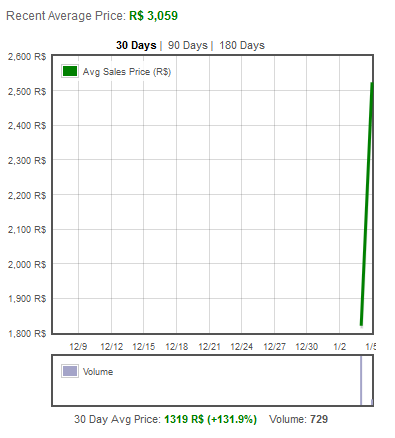
Pricing: This gear hit the Catalog on on Friday, 1/4/2012, at around 7:00 pm PST. Selling for 1k at 500 in stock. It took about 5 minutes to sell out. Sadly for me I didn't get it, but anyone who did, profited. When it sold out, the price was at around 2k robux and then dropped a bit. Then it started quickly raising. Currently it's at 3k and it's worth seems to be increasing. It's a good gear, and if you got it when it first came out it's also good profit. I'm no fortune teller, but from how it's looking the only direction this item is going is up. And the hurricanes are totally worth the original price! 10/10


Overall: It's a good item in general. Very effective at short range, if your enemy is next to you it's an almost guaranteed one hit kill. It's also profitable in the long run. 8/10

Interview with cougar8!

cougar8

Today I bring you another gift interview! This time I caught up with cougar8 - an avid LMaD forumer! This is what he had to say:

1) Out of all the gifts this year, which do you believe had the best texture? Why? 

I like the High Frequency Trading Gift because it was really easy to get, I also liked the warping of it with some of the hats and the last but last I think if it went limited it could sell for a bit of money.

2) How many gifts did you obtain in total this year? How many did you buy and how many did you earn through the gift achievement? 

I earned 8/9 missing out on the last gift. I brought 4 and earned 4.

3) What is your favourite gift item of all time? Why? 

I would have to go with High Frequency Trading Gift. I don't really know why I like it, maybe it is because it is the closet thing I can get to Night Vision Goggles.

4) Which gift do you believe had the best item inside this year? 

I still go with the High Frequency Trading Gift.

5) Do you prefer hat or gear inside gifts? 

I would prefer to have a hat inside a gift.

6) What was your favourite gift to earn this year? Why? 

Ticket to Ride Gift was my favourite gift to earn this year. It was my favourite because you could get money for doing it.

7) How many gifts do you have in total from all your years on ROBLOX? 

I have 20 gifts overall.

8) Overall, do you feel that the gifts were easier or harder to obtain than the one in previous years?

I would have to go easier but then I can't really remember last year.

9) If you were to select a difficult gift achievement for 2013, what would it be? 

Any forumer with 10k+ posts would get a gift.

10) And finally; if you could change one thing in the 2013 Giftplosion, what would it be? 

That you would have a little area down near the  "Player Badges" on your profile and it would say something like achievements that you have got for the Giftplosion and when your earn a gift you will get a achievement saying that you have earned it.


Thanks,

Arbirator
-Editor of Roblox News

Friday, January 4, 2013

Reason 2 Die Resurrection Review #1

I wouldn't hold a Molotov like that. >_<
For those of you who have played ROBLOX for a while. You might remember an old game by Placerebuilder called Reason 2 Die. I was one of those people and played it an unhealthy amount of times. If you've never heard of it then let me tell you about it.
Gameplay 10/10
Each game starts out with one player as the zombie and all the others as survivors. The survivor's goal is to survive until help arrives. Normally in the form of a jet, a train, or a flying present. However, if you are killed then you become a zombie. It seems simple and boring at first but there is a ton of detail involved in it. Survivors can find Medkits, molotovs, and pills scattered throughout the maps. You can move barrels to block entrances so zombies can't get in. There are also different zombie types. There's the smoker who can use it's large tongue to grab people from afar. The boomer that can vomit on survivors, blurring their vision and slowing them down, and my personal favorite the Tank. The Tank is capable of enduring a lot of damage. He can also throw rocks at survivors for a one-hit-kill.
Effort 8/10
Everything in this game blows me away. The way the doors work and how zombies can damage them and not get through them. The way you can break glass windows for a quick getaway. The only problem I have is that there aren't enough maps.
Creativity 8/10
This game is obviously based off of Left 4 Dead. However, seeing as this game was originally made before the zombie craze that gripped ROBLOX. (I personally think this game caused that craze) it doesn't get a low rating.
Overall 9/10
Suggestions
  • PLEASE bring back the farmhouse map
  • Fix the doors, sometimes zombies can get in
  • Add the hunter
  • Have a shop system instead of randomly saying "buy van"
  • Have a ninja zombie that is disguised as a flower pot.
If you want your place reviewed simply contact Banjobug on twitter or send me a private message on ROBLOX. The next post could be about your place! I'll be glad to give you ideas on your place and help make it better. Also, if you find a place that is absolutely awful and on the front page send me a PM and I might make a RANT about it!

Also, you should follow me on twitter even if you don't have a RANT or review request! Sometimes I invite my followers to go to places with me to help review them.

Place Reviewed: Reason 2 Die

Reviewed by: Banjobug      

Interview with california101!

Today I bring you another gift themed interview! This time, I interviewed california101 - an avid ROBLOX Talk forumer with almost 5,000 posts to his name and an ice cream on his head. 

california101


1) Out of all the gifts released this year, which do you believe was most worth the effort? 

I personally think the Commissioners Gift of Commissions was most worth the effort. The Commissioner is probably my most favorite gift item. The hat is a fedora, sunglasses AND a mustache all in one!

2) How many gifts did you obtain in total this year? How many did you buy and how many did you earn through the gift achievement? 

I obtained 8 gifts this year. I earned 5 and bought 3

3) What is your favourite gift item of all time? Why? 

Opened Crimson Gift of Good Citizenship. Inside a Racing Helmet was found, which I find to be a nice, classic hat that reminds me of my early ROBLOX experiences.

4) Which gift do you believe had the best item inside this year? 

Commissioners Gift of Commissions.

5) Do you prefer hat or gear inside gifts? 

I prefer hats. Hats can be used to enhance your character more than gear.

6) What was your favourite gift to earn this year? Why?

High Frequency Trading Gift. I traded back and forth with friends and it forced most people to work together to get the gift.

7) Do you enjoy completing tasks to earn gifts? 

Yes. I like tasks that make you think and are very vague about how to get them. Those kinds of gifts make you use your imagination and make you think about how to get them. No gifts this year were very vague about how to get them, but I still think some of the gifts made you use your creativity to get them in the easiest possible way.

8) Overall, do you feel that the gifts were easier or harder to obtain than the one in previous years? 

I think this year's gifts were harder to obtain.

9) If you were to select a difficult gift achievement for 2013, what would it be? 

For 2013, I would maybe add some difficult riddles that would need to be solved to find out how to get the gift. That would make the gift giving a bit more interesting.

10) And finally; if you were to sum up the Giftsplosion 2012 in one word, what would it be? 

Unexpected. People each had their own theory on how to get each gift, and when it was released it was one of those "How could I not have known?" moments. The gift items were not what anyone expected at all.


Thanks,

-Arbirator
Editor of Roblox News


Data Persistence: How-to.


Hello Robloxians! TechTeam911 here again, with a new scripting tutorial on how to use the powerful Roblox feature, Data Persistence.

History:
Data Persistence was introduced by John Shedletsky back in April of 2011 (Blog article). Before it was released, users who were fluent in Rbx.Lua would use their own algorithims to convert data into text. Players would then be able to save the converted data as a string of numbers/letters onto their computer for later reference. When a user wished to retrieve data, they would then copy the string they were given into another area, where it could be decrypted. A well known users that created pseudo data persistence was Mariostar6464.

How it works:
Data Persistence is very similar to a database program called SQL. SQL is a database in which data can be saved/retrieved on the fly. SQL is commonly used among websites where data is meant to be stored on a server for later use, such as MeepCity, Amazon, Roblox, and other popular sites that require you to sign-up. SQL requires forms on sites that use it to enter a key specific to that database, so that hackers cannot randomly read/write data from the database.

Fun fact: When you hear a person on Roblox bragging/claiming that they "SQL'D Roblox" - it means that they are claiming that they found the passwords to the Roblox database, and were able to change/view data. Users that claim to SQL sites are frequently bluffing - because it would take years to find out the password for an SQL server with a strong password. (Think 20 - 30 characters, alphabet, numbers, symbols, lower and upper case.) If the user has an average computer, it would take ages to preform that at one password per second. However, if they have a very, very powerful computer, and the resources/programs to do it (Guessing at 1000 password a second, without CAPTCHA), it would take around 5 days. But, most sites have methods in place to prevent users from guessing so fast.

Data Persistence in Roblox:

Data Persistence in Roblox is like MySQL. You can read and write data to the database by using the methods supplied by the Roblox developers. In an effort to prevent users from reading/writing unwanted data using Data Persistence, Roblox developers implemented a few requirements, which must be met in order to use Data Persistence.

1. "Data persistence methods cannot be called from within a LocalScript. You'll need to process the saving in a Script."

What it means: It means that when using Data Persistence, you have to use it inside a script, not a local script.

Why they did it: Local scripts are loaded into the client environment and run client-side, scripts are never loaded into the client environment, they are run server-side. It prevents users from stealing a working copy of a place, because the server-side scripts won't be copied over. It also prevents users from using exploits to tamper with their own data/data of other users.

2. "There's a limit on how much data can be stored per player per place."

What it means: You can store up to 45000 bytes of data, per player, per place. If your curious as to how to figure out how much saving something would take up in terms of bytes, see this Roblox Wikipedia article (http://wiki.roblox.com/index.php/DataComplexity)

Why they did it: Roblox hosts data on a service offered by Amazon called AmazonS3. AmazonS3 allows a certain amount of storage with a certain amount of bandwidth for a certain amount each month. If Roblox goes over the limit Amazon sets, then they move into the next tier, which forces Roblox to pay more per month.

Consider it this way. If 100,000 users use data-persistence, and they upload a car that is 40 bytes in size, that's 4,000,000 bytes. 4 million bytes is 4 gigabytes. Roblox has millions of users. If 3 million users make a car that is 40 bytes in size, that's 120,000,000 bytes. 120,000,000 bytes is 120 gigabytes. Roblox set a limit as to how much data could be stored, because on a large-scale with millions of users, users uploading data to Amazon's servers could get out of hand quickly, and toss the Roblox budget into chaos.

45,000 bytes is more than enough for the average player. 45,000 bytes is the average WTRB (Welcome To Roblox Building) creation - with all the parts/scripts included. If 3 million users upload 45,000 bytes of data, that's 135,000,000,000 (135 billion) bytes of data. 135 billion bytes of data is 135,000 gigabytes of data, which is 135 terabytes. I currently do not know how many users play Roblox, so 3 million is an example.

3. "Data is specific to both the player and the place - it is not possible to save data to a player that is shared between places (such as a keeping data after a teleport), nor is it possible to save data to a place which is shared between players (such as saving high scores)"

What it means: Currently, Data Persistence is limited to being able to save data to only the player, and only to the place where the data was saved at. Currently, Roblox developers are considering an idea in which users can load/save data between places (http://blog.roblox.com/2012/01/the-big-bang-at-roblox-universe-creation/). This can be used to create multiple chapter RPG games that span across multiple games, being able to make a script that bans users from all places if necessary, and making models in-game that can be transferred across multiple places.

Now that the limitations are out of the way, lets look at the methods that will become handy while you are working with Data Persistence.

Most important thing about Data Persistence to remember is called, "Keys". Keys are what you save your data to, and what you use to find it later on. Think of it like a safety deposit box. You put your stuff in it, you can take your stuff out, and you can do what you want with it. If you forget where you put your safety deposit box, how will you put/take stuff out?

Worst of all, if you forget the key, there's no way to find out what it is later on. Currently, Roblox is lacking a Data Persistence management system for places, but that is something we should expect in the near future (Data Persistence is still new, so they're ironing out the kinks/improving on it.)

LoadBoolean()

How it's used: A boolean is a true or false statement. As the name says, it loads a true or false statement. This can be used to tell if a user was specified a permanent administrator while in a server by the owner, or if a user is banned etc.

How to use it:
When loading and saving data, the first thing you always must do is check to see if the data is ready to be accessed. If you try to access the data without waiting first, the script will toss you an error. It's like trying to make a car that is off accelerate - you can't do it.

Example: This loads a saved boolean called, "Ban"
game.Players.PlayerAdded:connect(function(player) -- Player entered the game.
player:WaitForDataReady() -- Crucial, you have to wait for the data server to be ready before retrieving.
local ban = player:LoadBoolean(Ban) -- Load the boolean called, "Ban".
if ban == false then -- Is the loaded Boolean false? It also returns false if Ban was never saved.
print ("Player is not banned") -- Player is not banned, self-explanatory.
else -- What if it isn't false?
print "Player is banned" -- The player is indeed banned.
player:Destroy() -- Removes the player
end -- End tag for the if ban == false statement.
end) -- End tag for the function.

LoadNumber()

How it's used: LoadNumber is as it describes - it loads a saved number. If the number doesn't exist, then it automatically returns 0. This is helpful when making persistent leaderboards and saving stats, such as time played, or how many kills a person has.

How to use it: Remember the rule with accessing data - always wait for the data to load first. If when you try to load a number, and it ends up it was never saved, it automatically returns 0.

Example: This loads a number called, "Kills" into a leaderboard.
game.Players.PlayerAdded:connect(function(player) -- Player entered the game.
player:WaitForDataReady() -- Wait for the data to be ready.
local leaderboard = Instance.new("Model") -- Create a new model.
leaderboard.Name = "leaderboard" -- Name it, "leaderboard".
leaderboard.Parent = player -- Put it inside the player.
local kills = Instance.new("IntValue") -- Create a new IntValue (Used for leaderboards)
kills.Name = "Kills" -- Name it kills
local killNum = player:LoadNumber(Kills) -- Try to load a number saved under the key, "Kills"
kills.Value = killNum -- Set the value of kills to killNum (If it didn't load, it would be 0, so it doesn't matter.)
kills.Parent = leaderboard -- Parent kills to the leaderboard
end) -- End for the function

LoadString()

How it's used: Lets say you want to load and save a specific thing about a player, so you can look at it later on. LoadString loads a string with the key you supply.

How to use it: Remember rule - wait for data to load first before accessing it. If you never saved a string under the key your trying to load, it'll return a blank string.

Example: This loads a string under the key, "ThingIenjoy" and makes a message with it, letting the world know what that user likes.

game.Players.PlayerAdded:connect(function(player) -- Player entered game.
player:WaitForDataReady() -- Wait for the data to be ready.
local thingPlayerEnjoys = player:LoadString("ThingIEnjoy") -- Load a string under the key, "ThingIEnjoy".
if thingPlayerEnjoys ~= "" then -- Make sure that it isn't blank.
local m = Instance.new("Message") -- Create a new message.
m.Name = "PlayerLikesThis" -- Name it, "PlayerLikesThis".
m.Text = (""..player.Name.." enjoys "..thingPlayerEnjoys.."") Set the text of the message to, "Playernamehere enjoys thing that the player enjoys".
m.Parent = game.Workspace -- Parent it to workspace.
game:GetService("Debris"):AddItem(m,5) -- Make the message vanish after 5 seconds.
end -- End for the if statement
end) -- End the function

LoadInstance()

How it's used: Lets say you have this elite game where users get to build their own cars and race them. A user spends an hour working on this drag-car, but he doesn't want to let his work vanish once he's gone. With Data Persistence, it is possible to save his work, and load it later on.

How to use it: Remember the rule (Need I remind you once more?) Also, in terms of how much data you can store, you used to be able to use something called DataCost on instances, but the developers locked it for some reason. If your thing is too big, it won't save - big being the maximum no. of parts in a WTRB creation (Huge house, mansion etc.) Also,

Example: This loads an instance under the key, "SavedCar" and puts it into workspace.

game.Players.PlayerAdded:connect(function(player) -- Player entered game.
player:WaitForDataReady() -- Wait for data to be ready.
local savedCar = player:LoadInstance("SavedCar") -- Loads an instance called, "SavedCar".
if savedCar ~= nil then -- Make sure that the car actually exists before we try to tinker with it.
savedCar.Parent = game.Workspace -- Parent it to workspace.
savedCar:MakeJoints() -- Make the joints of the car, otherwise it might fall apart.
savedCar:MoveTo(player.Character.Torso.Position + Vector3.new(0,5,0)) -- Move the car to the torso position of the player, and move it five studs up. Watch it fall on the player's head, lol.
end -- End for the if statement.
end) -- End for the function.

SaveBoolean()

How it's used: Lets say you want to ban a player from your place forever. You can save a boolean to him, and use the earlier example to see if he has indeed been banned before.

How to use it: Remember the rule. Booleans can only be true/false.

Example: This saves a boolean under the key, "Ban" to players that aren't epic enough to join our 1337 game.

game.Players.PlayerAdded:connect(function(player) -- Player entered.
player:WaitForDataReady() -- Wait for the data to load
if player.Name ~= "TechTeam911" or player.Name ~= "arbirator" then -- Is this person worthy enough to join?
print("Not epic enough")
player:SaveBoolean("Ban",true) -- Saves a boolean set to true under the key, "Ban".
player:Destroy() -- Destroy the player.
end -- End for the if statement.
end) -- End for the function.

SaveNumber()

How it's used: You were pwning noobs at your awesome game, and you want to keep track of all your pwnsome kills. Using SaveNumber, along with my earlier example, you can keep track of their kills.

How to use it: Remember the rule. Numbers are numbers, letters/symbols are obviously not numbers.

Example: This saves the player's kills to load later on.

game.Players.PlayerLeaving:connect(function(player) -- A player is leaving
player:WaitForDataReady() -- Wait for data to be ready to be accessed.
player:SaveNumber("Kills",player.leaderboard.Kills.Value) -- Save the player's kills under the key, "Kills".
end) -- End tag for the function.

SaveString()

How it's used: Lets say that you want to save a specific comment with a player, like something that they like. Using SaveString, you can do so.

How to use: Remember the rule. Strings are letters/numbers/symbols.

Example: This saves a string called, "pie" under the player when they leave. Using the earlier example with LoadString, it will say, "Usernamehere enjoys pie"

game.Players.PlayerLeaving:connect(function(player) -- When a player is leaving.
player:WaitForDataReady() -- Wait for data to be ready.
player:SaveString("ThingIEnjoy","pie") -- Saves the string, "pie" under the key, "ThingsIEnjoy".
end) -- End for the function.

SaveInstance()

How it's used: A user is building an awesome car in your car making game, but he doesn't want to lose that 1337 creation. Using SaveInstance, you can save that user's car and load it later LoadInstance().

How to use it: Remember rule. Total saved data to player cannot be over 40 kilobytes for everything.

Example: This saves a model in workspace called, "Car" into the player for later loading.

game.Players.PlayerLeaving:connect(function(player) -- Player is leaving
player:WaitForDataReady() -- Wait for the data to be ready.
player:SaveInstance("SavedCar",game.Workspace.Car) -- Saves a model to the player, the model being an object in workspace called, "Car" under the key, "SavedCar".
end) -- End of function.

Also, if you need to erase an instance, you can go, player:SaveInstance("keynamehere",nil). That allows you to erase an instance if necessary.

Summary:
Data Persistence is a very powerful feature that Roblox has offered users. New scripters may find Data Persistence difficult to understand, but they will come to understand it as their scripting skills increase. Data Persistence is bound to be upgraded, because as Roblox becomes older, newer features/upgrades are released. John Shedletsky once suggested the idea of a Data Persistence control panel, and it is under consideration.

This has been a scripting tutorial by TechTeam911 - I hope you enjoyed it! I will release more scripting tutorials as the time passes by.

Tuesday, January 1, 2013

Interview with rudolph101!

Greetings Roblox News readers! Today I bring you another gift interview with rudolph101 - the 365 days a year Santa Claus: he's the real deal.

rudolph101

1) Out of all the gifts released this year, which do you believe was the hardest to obtain bar the Coolest Gift?  

Probably the Self-Referential Gift of Referring because first of all, nobody really knew how to get it and finding somebody who is about to buy builder's club is pretty hard to do, let alone convince them to refer you. This was also one that you could make another account and do it, but it would cost you money.

2) How many gifts did you obtain in total this year? How many did you buy and how many did you earn through the gift achievement? 

I obtained 7/9 gifts this year. 5 of which I earned and 2 of which I bought.

3) What was your favourite gift item this year? Why? 

Probably the candy cane antlers because there have only ever been two antler hats before, so getting a new one is a pleasant surprise. The also look very nice in my opinion too.

4) Which gift do you believe had the best texture this year? 

In my opinion the Ticket to Ride Gift had the best texture. I just like the idea of having trains on the wrapping paper.

5) Before the 7 Jeweled Circlet came out of the Lucky Gift of Sevens. What were your ideas of the items that might have lay inside? 

I had absolutely no idea of what could be in there. I thought it would be something to do with the number 7 but I just couldn't figure it out.

6) What was your favourite gift to earn this year? Why? 

I don't think any of the gifts were that fun to obtain this year, but out of all of them it would probably be the Commissioner's Gift of Commissions because it was probably the gift that required you to put the most effort into it.

7) What was your favourite gift of all time on ROBLOX? Why? 

Probably the 8-Bit Gift of Gaming because I enjoyed earning those badges. I liked the idea of having to go onto different games and do different things. It was also quite challenging which I liked and was different to the things we usually do on the website.

8) Do you enjoy completing tasks to earn gifts? What type of task is your favourite? 

I like completing tasks to earn the gifts. I enjoy the tasks which involve you going onto games and earning badges because it is different and more fun than the usual tasks.

9) Overall, do you feel that the gifts were easier or harder to obtain than the one in previous years? 

I think the gifts were quite a lot easier to obtain this year. Firstly I think this because with a lot of the gifts they said exactly what you were supposed to do. Second of all with the fundraising gift and the ticket to ride gift you only had to sell 1 item, and in my opinion it should've been at least been 10.

10) If you were to select a wacky name for a gift released Christmas 2013, what would it be? 

Rudolph101's Wacky Gift of Joy


Thanks,

-Arbirator
Editor of Roblox News


Place Review: [Escape!] Escape School Detention by Robocon6

Place Reviewed: [Escape!] Escape School Detention
Place Creator: Robocon6 [Banned]
Game Last Updated: 1 year ago


This is one of those games that has an appeal to children. If you've ever been in a detention, you would want to get out, right? So people are going to click this game, and try it out, maybe even hoping for some tips on how to escape detention in real life. However, there are thousands of 'Escape School' games that have been made on ROBLOX. Is this game better than the majority of games of this type on ROBLOX, poorly made and rushed? Keep reading to find out!


When I joined the game, the first thing I noticed was how badly scaled the classroom was. Look at how big the desk is compared to me, it is virtually the same size as me, when usually they're up to the waist. I also noticed that the seats, which, as well as the desks, were out of proportion. In addition, the part of the chair that you sit on was hovering above the legs, which shows that the game has been rushed. After completing a few stages, I came to a stage called The Bully. However, where was nothing there, just an empty pit that I had to make my way across, probably the easiest stage in the game.


A few stages on, there was a fan which blew me backwards, but much more effort could have been put into the fan as it was static, which made it look as if it was turned off, but it still pushed me backwards. I was then teleported to a room, which I suppose was meant to be a classroom, I think anyway. Instead the room had no walls, which would get quite cold in winter. However, when I joined the game the next day to finish the review, the walls were there so that was a glitch in the game which needs to be sorted out. After a few minutes, I reached the school canteen. I had to jump from table to table without touching the floor, or else I would fall through the floor, which is really unrealistic.

If you're going to make an escape school game, you could at least do it properly, and as realistic as possible, like finding open windows to jump through, and if the creator is very good, pushing tables and chairs around to form a structure enabling the user to jump out the window. Anyway, I reached the library next, which was basically a maze of blocks with blurry decals on which were supposed to look like shelves with books on. They could have been better made, possibly even using bricks, to make the library more appealing.

After completing the badly made maze, the last thing I had to do was run home. I first had to jump over a gate, which was an obvious free model, and then run through a street with three dogs chasing me, then avoid an angry parent who was trying to kill me, for no obvious reason. I then had to make my way through a forest full of free models, and I finally arrived at the winners area, which was obviously free modeled as it had somebody else's name on the bottom of the swing!


Here's a few building tips if you are building any type of 'Escape _____' game.

  • Make things in scale with the character. Tables should be a maximum of two studs high, chairs one stud and a plate. Try inserting a character, or regularly test the game on play mode to make sure things look good.
  • Try to stand out from the crowd. Make the game exciting, to keep people playing. Try to do things people have never done before, and let the player be more involved in the game, for example shutting down CCTV using a button hidden in a teacher's room.
  • Use free models as little as possible. You'll most likely get lots of hate if you use free models. Try to build, it's much more fun than inserting loads of free models and people will value your game much more.
  • Make the game as realistic as possible. Make use of the materials you have been given. Use the wood material for tables and desks, use the grass material to make the outside look appealing.
  • If you want your game to be popular, save some money and advertise. There are some advertising tips and tricks by Rob498 you can check out, just click here.

Summary:

Gameplay: 2/10

There was nothing in the game which made the game exciting and fun to play.


Creativity: 1/10

There are thousands of games like this on ROBLOX, and this game doesn't stand out from the crowd.


Effort: 2/10

Every level was poorly made, and they all lacked creativity. Things were poorly scaled, and badly constructed.

Overall: 2/10